Feng Office releases versions 3.11.6 & 3.11.7:
Versions 3.11.6 and 3.11.7 of Feng Office introduced a set of powerful updates that improve how teams manage projects, track financial performance, and maintain control over billing and expenses. With new reporting tools, refinements to the automated invoicing process, and smarter expense handling, these improvements help organizations gain clearer visibility and make better decisions using reliable data.
Here’s an overview of what’s new.
New reporting capabilities, more accurate billing, and improved expense management
Introducing the “Unbilled work aging” report
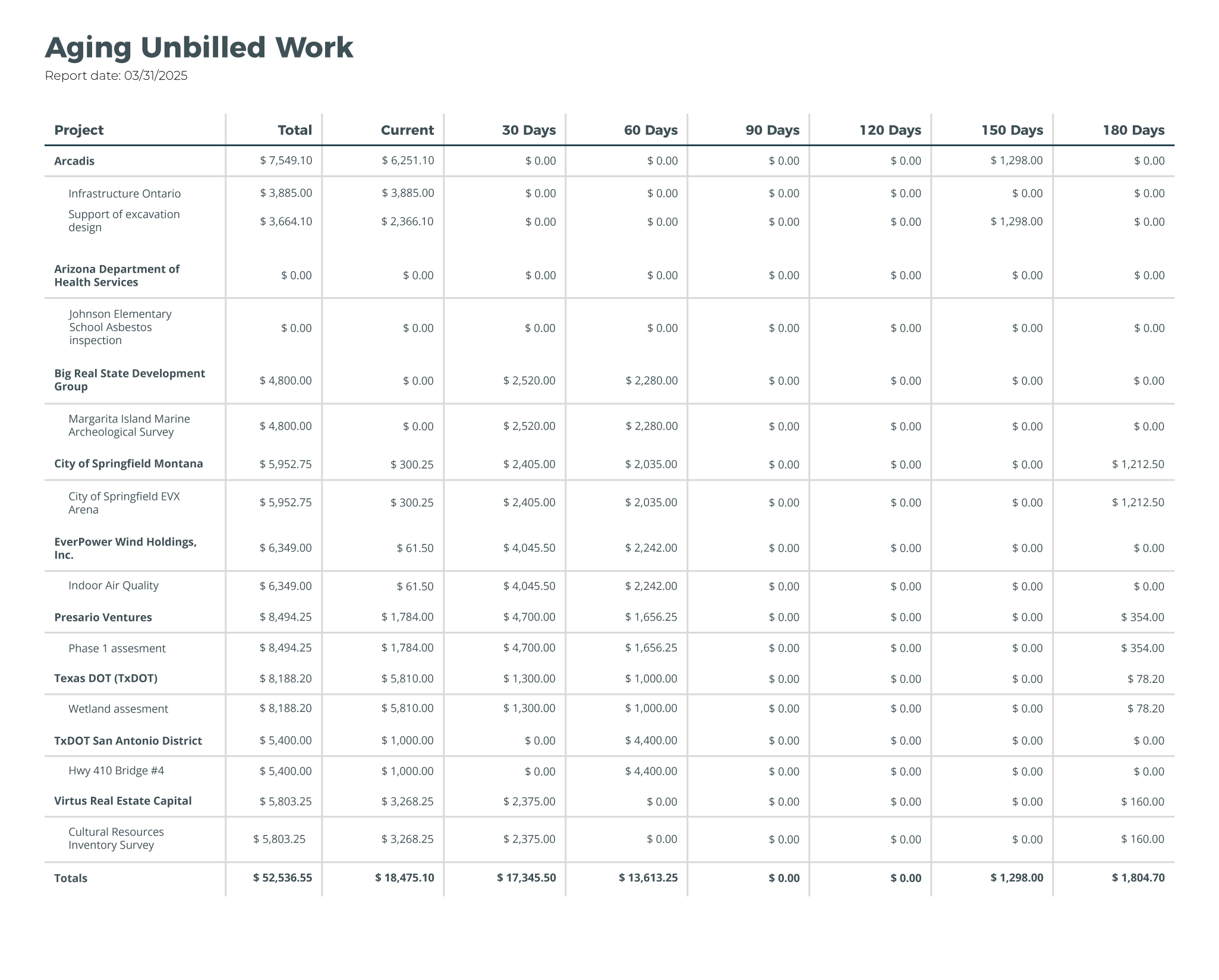
Version 3.11.6 introduces the Unbilled work aging report, a new financial report designed to help teams understand and manage unbilled work more effectively.
This report provides a clear breakdown of work that has been completed but not yet billed, including time entries, finished tasks, and billable expenses. Users can see how long items have remained unbilled and identify which projects or clients contribute most to delayed revenue.
Why does this matter? In many project-based organizations, billable work often accumulates before invoicing happens. Without clear visibility, it becomes easy to lose track of pending revenue, which can impact cash flow and financial planning. This report helps teams spot billing delays early, prioritize invoicing, and maintain healthier financial operations.
With flexible grouping options such as project, project manager, client, or project phase, the Aging Unbilled Work Report makes it easier to identify bottlenecks and keep revenue moving.
New report: Work in progress (WIP) summary by project
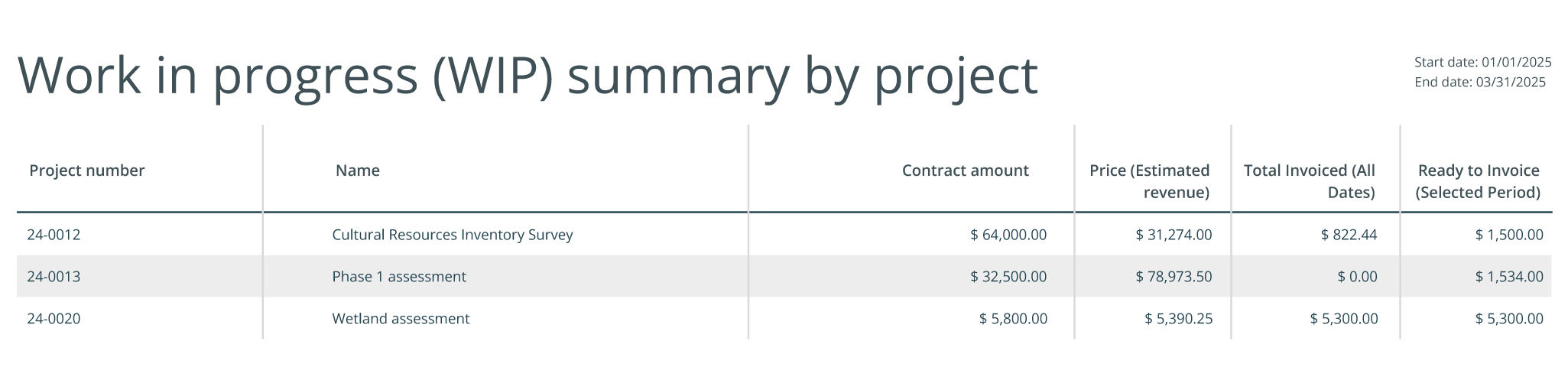
Another key addition in these releases is the “Work in progress (WIP) summary by project” report. Based on the previous WIP report, this new version has been condensed to deliver faster financial insights that facilitate immediate corrective actions.
Users can now review contracted values, estimated revenue, total invoiced amounts, and amounts ready to be invoiced, all at once. This allows project managers and financial teams to compare planned revenue against actual billing and better understand project progress from a financial perspective.
By bringing financial data closer to day-to-day project management, this report supports more accurate forecasting, better cash flow awareness, and stronger control over project profitability.
Deeper insight with the “Project financials” report
The Project Financials Report has been further enhanced to provide more flexibility and sharper insights into financial performance across projects.
This report offers a consolidated view of costs, revenue, and profitability at the project level, helping teams understand where resources are being used and how projects are performing financially.
Expanded grouping options
Users can now group project financial data by up to three dimensions, allowing for more tailored analysis. Available grouping options include:
- Project type
- Project manager
- Client
- Project phase
- Rate schedules
- Country
Unbilled projects filter
A new filter allows users to focus specifically on unbilled projects, making it easier to identify outstanding revenue and address billing opportunities before they are overlooked.
These improvements support more informed decision-making and give teams a clearer understanding of financial performance across their project portfolio.
New: Address display format option for invoices
The invoicing modules has a new improvement with the introduction of the new “address display format” option. This enhancement provides more flexibility in how billing addresses are shown for clients across the world, helping teams produce clearer, more professional-looking invoices that align with their business location.
Smarter templates for expenses
Expense templates have been enhanced to support more accurate expense tracking during project execution. When creating project quotes using expense templates, users can now define the expense type for each budgeted item.
As the project progresses, actual expenses automatically inherit the correct expense type, reducing manual adjustments and ensuring more consistent financial data throughout the project lifecycle.
Additional Improvements
Alongside these feature enhancements, versions 3.11.6 and 3.11.7 also include performance improvements, usability refinements, and smaller adjustments that contribute to a smoother and more reliable experience across the platform.