
Feng Office Formula fields in Version 4 let you add automatic calculations directly inside your project forms. Define a calculation once, and the system displays the result automatically, useful for firms working across different unit systems, regulatory standards, or contract requirements without manual conversion steps.
Formula fields that adapt
to your regulations, clients, and contracts
Calculated fields
Unit conversions
Built-in formulas
Regulatory ready
One entry
Version 4 lets you add automatic calculations inside your forms, so the system handles unit and data translation without extra steps or outside tools
Project-based professional service firms don’t always work under the same set of rules. A firm might have contracts that require metric measurements alongside clients that work in imperial units. They might serve industries with different reporting standards, or operate across regions where temperature, distance, and area are expressed differently by regulation. Managing those variations has traditionally meant doing the conversion somewhere outside the project record, in a spreadsheet, a calculator, or someone’s head, and then manually entering the result. That’s extra work, and it’s a reliable source of errors.
Version 4 of Feng Office introduces formula fields, a way to build those calculations directly into your forms so the translation happens automatically, right where the data lives.
What is a formula field?
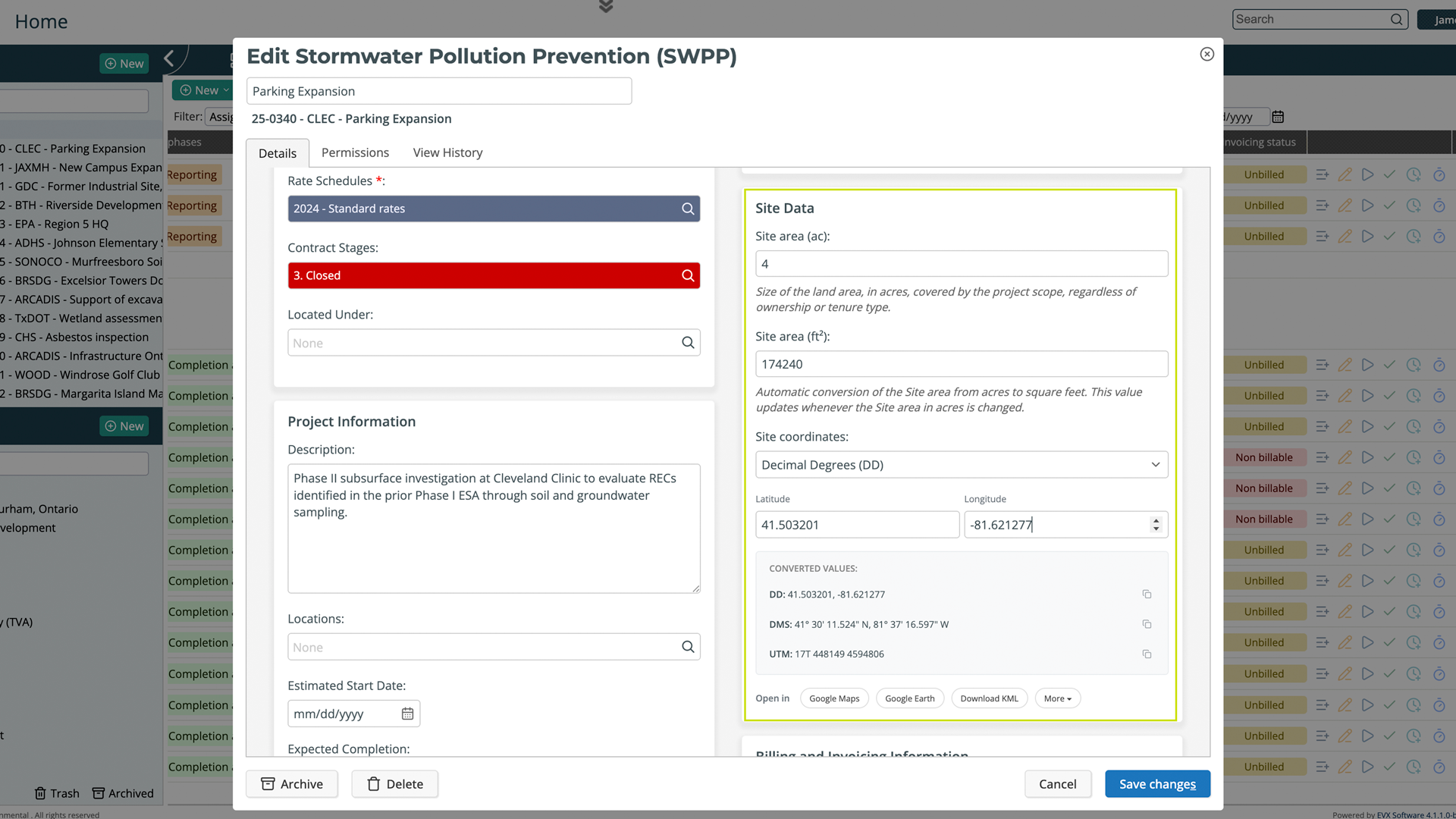
A formula field is a type of custom property. You create it through the same Object Properties settings used for any other custom property, give it a label, define the calculation, and add it to the form. From that point on, it works on its own. When a value is entered in the field it references, the formula field calculates and displays the result automatically. The user doesn’t do anything extra; the answer is just there.
The result is read-only, which is the point. It’s a derived value, not something that should be edited manually, because it’s always calculated from the source data already in the form.
Where this becomes useful in practice
Working across measurement systems
If your firm operates under contracts or regulations that use different unit systems, a formula field handles the translation inside the project record. Enter a site area in acres, and a formula field can display the equivalent in hectares. Record a temperature reading in Fahrenheit, and the Celsius value appears alongside it. There’s no separate conversion step and no risk of the translated value getting out of sync with the original because someone forgot to update it.
Different clients, different requirements
Some clients require data in specific formats or units as part of their contract requirements. Rather than maintaining separate records or running conversions at the reporting stage, you configure the formula field once for that form, and it handles the requirement automatically for every project that uses it. The client gets what they need, and your team doesn’t have to think about it each time.
Regulatory variation across regions or project types
Firms working across jurisdictions, or across different project types, often deal with data standards that don’t align. Formula fields let you build those regional or regulatory variations into the form itself, so the right values are always present regardless of who is filling out the record or where the project is located.
How to set it up
Formula fields are created in Settings, under Object Properties. When adding a new custom property, you select the formula type, write the calculation using other fields in the same form as references, and label the field clearly. Then you add it to the form layout through the same configuration used for any other property. Once it’s in place, it works automatically for everyone using that form, no training required beyond knowing the value will be there.
Why does keeping this inside the system matter
The practical difference between doing a conversion in a spreadsheet and doing it inside Feng Office is where the result ends up. A calculation done outside the system lives outside the project record. It might be in a file, an email, or someone’s notes, and it has to be manually transferred back into the project if it’s needed there. A formula field keeps the result attached to the project from the start, visible to everyone with access, consistent across records, and always based on the current source value.
For firms where data accuracy feeds directly into client deliverables, regulatory submissions, or technical reports, that difference is not a small one.
In short
Formula fields in Version 4 let you build automatic calculations into your project forms, so data translation between unit systems, regulatory formats, or client requirements happens inside Feng Office without any manual steps. You define the calculation once, and from that point on, the right value is always there, derived automatically from the data already in the form.
Book a private tour
See formula fields configured for your firm’s actual requirements
The value of formula fields depends entirely on your firm’s specific unit systems, client requirements, and reporting standards. You tell us what conversions or calculations your team currently handles manually, and we’ll show you how to build them directly into your forms.
- See a formula field configured and working live in a project form
- Walk through how calculations reference other fields in the same form
- Ask anything about formula types, read-only behavior, and how existing forms can be updated
- Get a clear picture of which manual steps formula fields would eliminate for your team before you commit to anything
About Feng Office
Built for the way project-based firms actually operate
Feng Office is not a generic project management tool with a few extra fields. It is a business management platform built specifically for project-based firms, where projects are complex, billing structures vary, and the people doing the work are often the same people managing it.
We are software experts, not project delivery professionals. Our job is to understand the operational reality of running a project-based firm and build tools that clear the administrative path, so your team can stay focused on the work that actually matters.
100%
Human support during implementation and beyond
1
Platform for projects, billing, invoicing, and reporting
PBF
Built exclusively for project-based firms
4.0
The most complete version we have ever shipped
⚙
Everything connected
Tasks, time entries, expenses, billing, and financial reporting live in one place. Nothing gets lost between the project and the invoice.
◎
Built for complexity
Multiple service lines, variable billing structures, work that doesn't fit a generic template. Feng Office was designed around that reality, not adapted to it.
↗
Visibility at every stage
You stop finding out a project is over budget after the invoice goes out. The reporting module shows where each project stands on budget, schedule, and billing at any point.
◈
Support that walks with you
Implementation is not a handoff. Our support is 100% human, and we are present during setup, onboarding, and every step after that.
⊞
One platform, not three systems
Data in one place, invoices in another, reports in a third. Feng Office replaces that with a single working environment where everything connects.