
Version 4 adds hover previews to Feng Office. Move your cursor over a task, location, person, or project and get the full picture of that record instantly, without clicking into it or leaving your current view.
See the full picture without
leaving your current view
Hover to preview
Skip the click
Full details on hover
Stay in your view
Without navigation
Feng Office faster data preview adds hover previews across the platform, without opening records.
Working through a project in Feng Office means moving between a lot of information. Tasks, locations, team members, and projects. Each one carries details that are relevant to decisions being made throughout the day. Getting to those details quickly, without losing your place or breaking your flow, is the kind of thing that seems minor until you’re doing it dozens of times a day.
Version 4 addresses this with hover previews in the task module, a simple change with a noticeable effect on how fast you can move through the platform.
What hover previews do
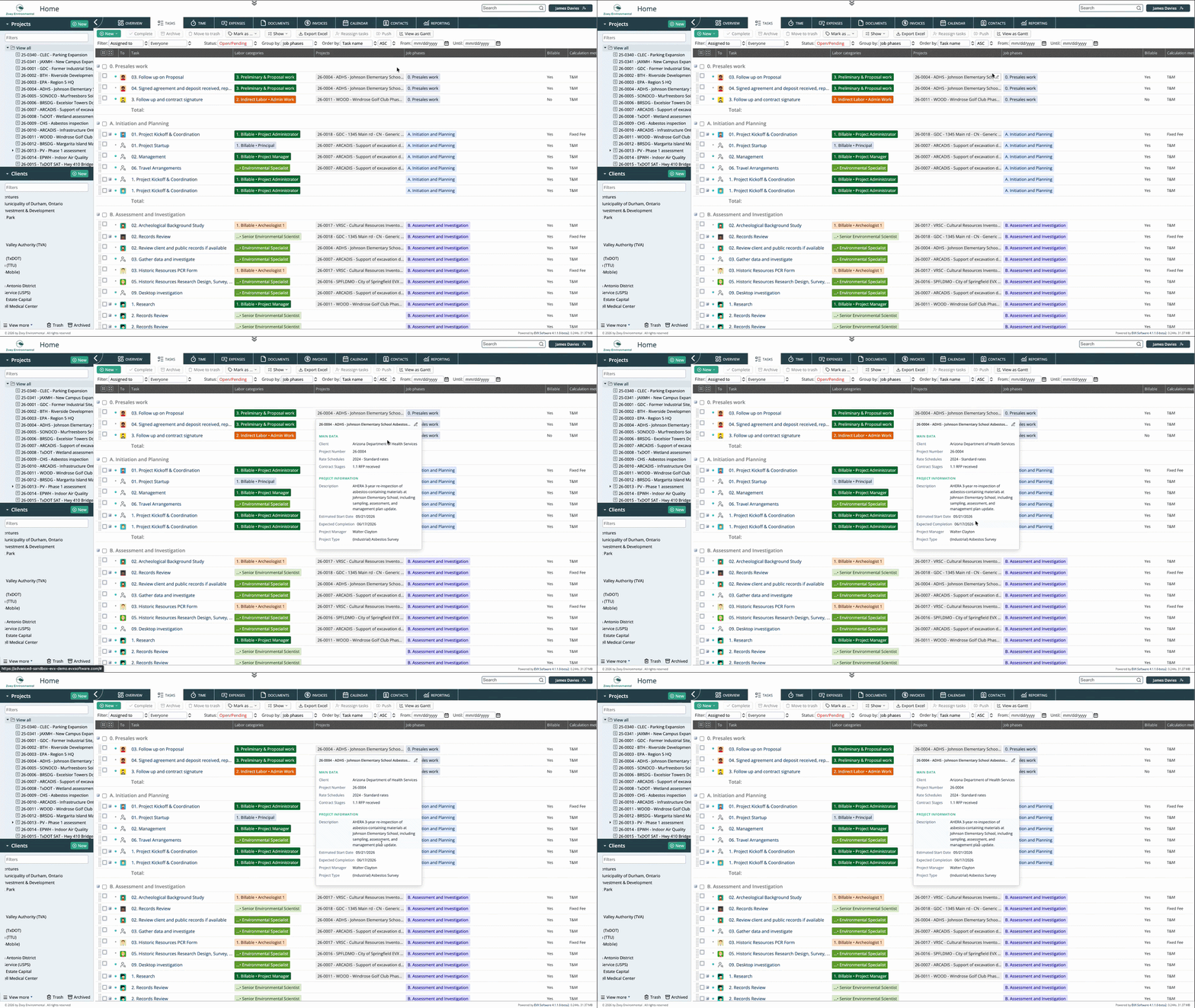
In Version 4, moving your cursor over a record shows a preview of its details directly in your current view. There is no click required and no navigation away from where you are. The information appears while you hover and disappears when you move on. You get what you need and keep working without interruption.
Before Version 4, hovering over a record showed nothing. If you needed to check any detail about a task, a location, a person, or a project, the only option was to open it. That meant leaving your current view, finding the information, and returning. For a single lookup, that’s minor. For a project manager reviewing a full task list or scanning through dimensions to verify assignments, it’s a constant source of friction.
What the preview shows
Hover previews in Feng Office are designed to surface the complete picture of a record, not just a name or a status. Depending on what you’re hovering over, the preview can include the full data associated with that dimension, things like locations with their relevant details, people with their assigned roles and projects, or tasks with their current status, dates, and associated information. The goal is that a hover gives you enough context to make a decision or confirm a detail without needing to open anything.
Where it makes the biggest difference
Reviewing task lists
When a project manager is scanning through a task list, they’re often looking for specific pieces of information across multiple tasks. With hover previews, that scan happens in place. Move the cursor across the list, check what you need on each item, and keep moving. No opening, no navigating back, no losing your position in the list.
Checking dimension data
Projects in professional service firms involve multiple dimensions, locations, people, project types, and others, each carrying its own data. When those dimensions appear in a form or a list, hovering over them now shows what’s behind them. A location previews its details. A team member previews their relevant information. That context, available instantly without a click, makes it easier to verify that the right records are connected to the right places in the project.
Better navigation between project dimensions
Projects are complex by nature. A project in Feng Office touches tasks, time entries, expenses, billing, documents, and contacts, and the people working on it often need to move between those areas frequently. The Version 4 interface introduces navigation improvements specifically designed to make those transitions faster and more intuitive, reducing the time spent orienting yourself and increasing the time spent actually working.
Navigating complex projects
Projects in project-based firms are rarely simple. A single project can involve multiple phases, locations, subcontractors, and team members, each represented by records in the system. Hover previews reduce the navigation overhead of working across that complexity, because checking a detail no longer means leaving the view you’re in.
A small change with a compounding effect
Hover previews are not a dramatic feature. They don’t change what data exists in the system or how it’s organized. What they change is how quickly you can access that data while working. And because the need to check a detail without fully opening a record comes up constantly throughout a working day, the time saved and the friction removed add up in a way that becomes noticeable quickly.
It’s the kind of improvement that’s hard to quantify but easy to feel. Once you’ve worked with hover previews available, going back to clicking into every record to check a single detail is something you’d notice immediately
In short
Version 4 adds hover previews to Feng Office so that moving your cursor over a task, location, person, or project shows its full details instantly, without opening the record or leaving your current view. Before Version 4, hovering showed nothing, and every detail required a click. Now the information is there when you need it, and you keep working without losing your place.
Book a private tour
See hover previews in context, not described in a paragraph
Reading about a feature that saves you clicks only goes so far. You tell us how your team navigates project data day to day, and we’ll show you exactly how hover previews change that in a live session.
- See hover previews working across tasks, locations, and team members in a real project view
- Walk through the dimensions your team checks most and how Version 4 surfaces that data instantly
- Ask anything about how previews work across different record types in the platform
- Get a clear sense of how the change affects daily navigation before you commit to anything
About Feng Office
Built for the way project-based firms actually operate
Feng Office is not a generic project management tool with a few extra fields. It is a business management platform built specifically for project-based firms, where projects are complex, billing structures vary, and the people doing the work are often the same people managing it.
We are software experts, not project delivery professionals. Our job is to understand the operational reality of running a project-based firm and build tools that clear the administrative path, so your team can stay focused on the work that actually matters.
100%
Human support during implementation and beyond
1
Platform for projects, billing, invoicing, and reporting
PBF
Built exclusively for project-based firms
4.0
The most complete version we have ever shipped
⚙
Everything connected
Tasks, time entries, expenses, billing, and financial reporting live in one place. Nothing gets lost between the project and the invoice.
◎
Built for complexity
Multiple service lines, variable billing structures, work that doesn't fit a generic template. Feng Office was designed around that reality, not adapted to it.
↗
Visibility at every stage
You stop finding out a project is over budget after the invoice goes out. The reporting module shows where each project stands on budget, schedule, and billing at any point.
◈
Support that walks with you
Implementation is not a handoff. Our support is 100% human, and we are present during setup, onboarding, and every step after that.
⊞
One platform, not three systems
Data in one place, invoices in another, reports in a third. Feng Office replaces that with a single working environment where everything connects.