
Set the field order, group properties, add custom fields, and connect dimension data, so the system collects information the way your firm actually works, not the way the software was built.
Forms that adapt to your firm,
not the other way around
Fully configurable
Custom properties
Field grouping
Field relationships
Your workflow
Version 4 makes every form in Feng Office fully configurable, so your data collection fits your projects from day one
Every project-based firm collects project data differently. The fields that matter to one team are not the same ones another needs. And a firm running multiple service lines has different information requirements than one focused on a single discipline. But most project management software gives you one form, built the way the developer thought made sense, and expects everyone to adapt to it.
Version 4 of Feng Office takes a different approach. Forms are now fully configurable, meaning your team decides how information is collected, organized, and displayed, not the software.
What configurable forms actually mean
In Version 4, every major object in Feng Office, projects, tasks, contacts, and others, has a form that can be adjusted directly from the settings panel. To configure a form, you go to Settings, then Object Properties, and select the form you want to modify. From there, you have full control over how that form works.
Field order
You decide the sequence in which fields appear. If your team always starts a project by assigning a project manager and defining the service type before anything else, those fields can sit at the top. The form follows your process, not the other way around.
Property groups
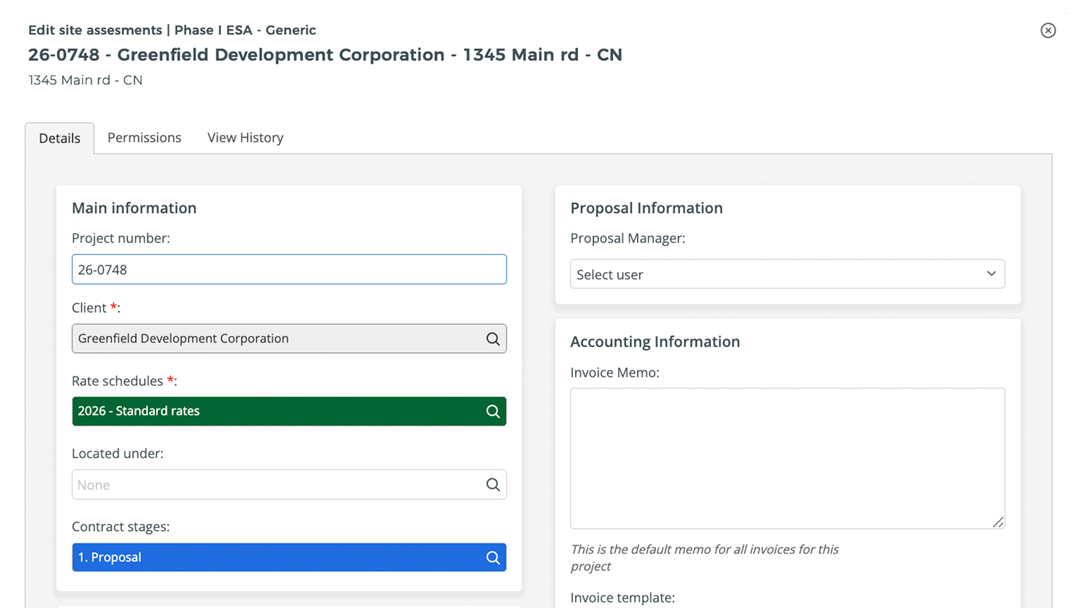
Fields can be organized into named groups using the Property Groups settings. This is where the card-based layout introduced in Version 4 becomes especially useful. Each group becomes its own card in the two-column form, so related fields are visually clustered together. A project form might have one card for general information, another for billing details, and another for service-specific data. The result is a form that’s easier to fill out and easier to review, because the structure reflects the actual categories of information you’re managing.
Custom properties
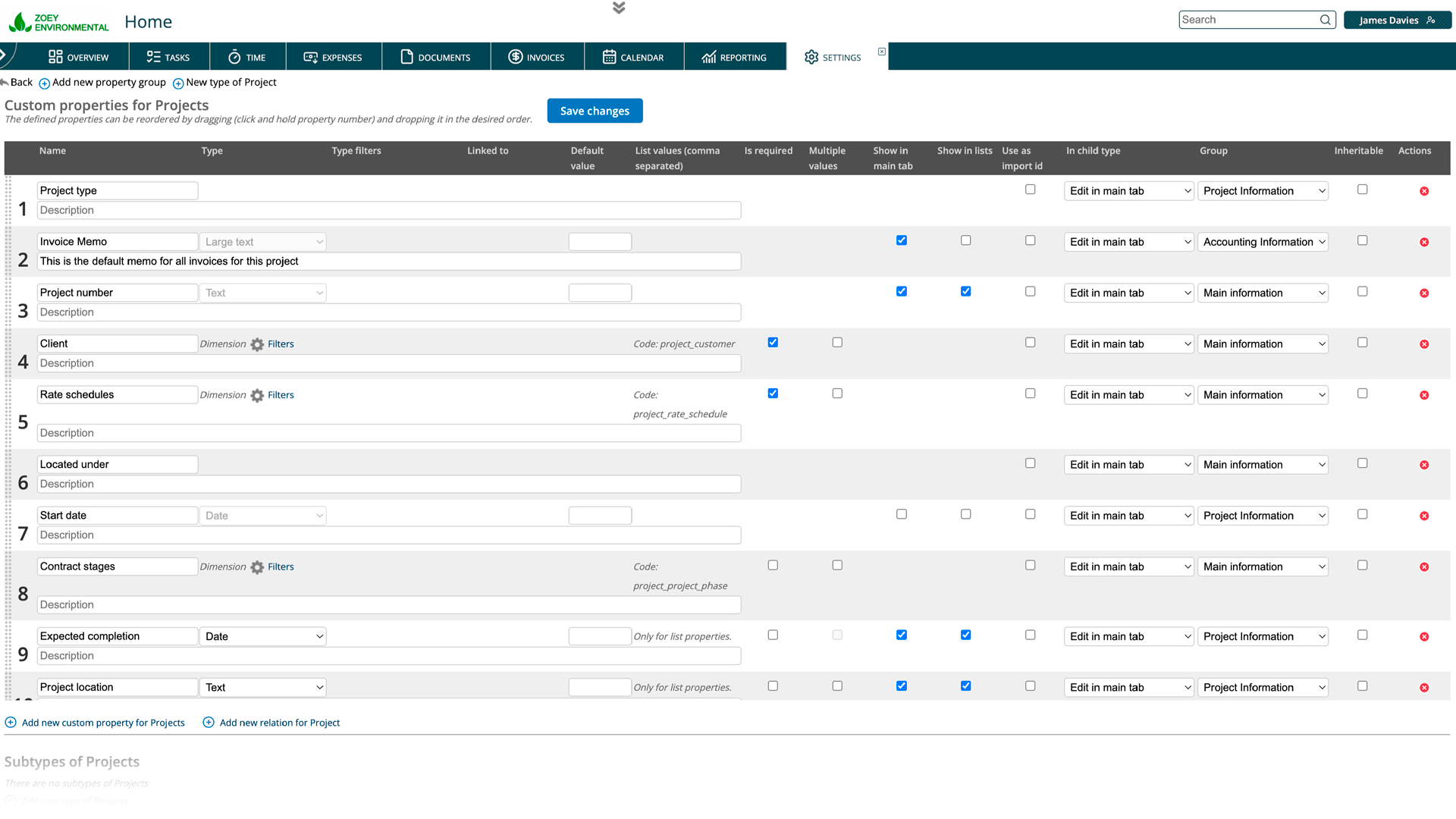
If Feng Office doesn’t have a built-in field for something your firm tracks, you can create one. Custom properties are data fields you define yourself, with your own label and field type. This means you’re not working around the system or stuffing data into fields that don’t quite fit. You add what you need, name it the way your team already refers to it, and it becomes a permanent part of your form.
Dimension relationships
Feng Office is organized around dimensions, the core categories your firm uses to structure its data, things like project managers, clients, service types, and locations. When configuring a form, you can add fields that connect directly to these dimensions. For example, a project form can include a field that pulls from the Project Managers dimension, letting the user select from that list rather than typing a name manually. This keeps data consistent across the platform and makes reporting more reliable, because every project is connected to the same underlying records rather than free-text entries that can vary by person.
Dimension relationships behave differently from simple lookup fields, because they carry the full context of the connected record. Selecting a project manager from the dimension doesn’t just store a name; it links the project to that person’s record in the system, which affects everything from time tracking to reporting.
Why does this matter for project-based professional services firms?
Projects in professional services are not generic. Different service lines carry different data requirements, and when your forms can be configured to match each one, your team spends less time navigating irrelevant fields and less time explaining to clients why the system doesn’t quite capture what the project actually involves.
It also reduces errors. When fields are in the order your team expects, grouped the way your workflow is structured, and labeled with the terminology your firm actually uses, data entry becomes more consistent. And consistent data means cleaner reporting, more accurate billing, and less time spent correcting records after the fact.
How to set it up
Configuring a form in Version 4 starts in Settings. From there, go to Object Properties and select the object whose form you want to adjust. You’ll see the current field layout and options to reorder fields, assign them to property groups, add custom properties, or include dimension relationships. Property groups are managed separately under the Property Groups section in settings, where you create and name the groups that will appear as cards in the form.
The changes you make apply to everyone using that form across your organization, so it’s worth taking a few minutes to think through the structure before configuring it. In most cases, the right starting point is to map out how your team actually fills out project information today, and build the form to match that process.
In short
Configurable forms in Version 4 mean Feng Office works the way your firm works. You set the field order, group related information into cards, create custom properties for data your firm tracks, and connect fields to the dimensions that keep your records consistent. The form becomes a reflection of your process, not a constraint on it.
Book a private tour
See how configurable forms work in practice
Reading about form configuration only goes so far. You tell us how your team collects project data, and we’ll show you how Version 4 handles it in a real session, no slides, no script.
- See property groups and card-based layouts in context, not in screenshots
- Walk through the fields, your projects actually need, and how to configure them
- Ask anything about custom properties, dimension relationships, or the setup process
- Get a clear picture of what the configuration looks like for your firm before you commit to anything
About Feng Office
Built for the way project-based firms actually operate
Feng Office is not a generic project management tool with a few extra fields. It is a business management platform built specifically for project-based firms, where projects are complex, billing structures vary, and the people doing the work are often the same people managing it.
We are software experts, not project delivery professionals. Our job is to understand the operational reality of running a project-based firm and build tools that clear the administrative path, so your team can stay focused on the work that actually matters.
100%
Human support during implementation and beyond
1
Platform for projects, billing, invoicing, and reporting
PBF
Built exclusively for project-based firms
4.0
The most complete version we have ever shipped
⚙
Everything connected
Tasks, time entries, expenses, billing, and financial reporting live in one place. Nothing gets lost between the project and the invoice.
◎
Built for complexity
Multiple service lines, variable billing structures, work that doesn't fit a generic template. Feng Office was designed around that reality, not adapted to it.
↗
Visibility at every stage
You stop finding out a project is over budget after the invoice goes out. The reporting module shows where each project stands on budget, schedule, and billing at any point.
◈
Support that walks with you
Implementation is not a handoff. Our support is 100% human, and we are present during setup, onboarding, and every step after that.
⊞
One platform, not three systems
Data in one place, invoices in another, reports in a third. Feng Office replaces that with a single working environment where everything connects.