
Feng Office automatic naming and numbering populates the field automatically as you fill out the form. Define your naming format once in settings, and Feng Office builds it in real time from the project data, consistently, every time, with no manual entry required.
Consistent project names,
generated automatically as you work
Automatic naming
Real-time preview
No double entry
Consistent records
Auto-numbering
Version 4 builds project names and numbers from your own rules in real time, so every project is named the right way from the start
Project naming sounds like a small thing until you’ve spent time searching for a project because someone named it differently than expected, or found duplicate entries because two people used slightly different formats, or realized your numbering system broke down somewhere along the way, and now you’re not sure which version of a project record is the right one. For project-based firms managing dozens of active projects at a time, inconsistent naming creates real problems in tracking, reporting, and billing.
Version 4 of Feng Office removes the guesswork from project naming entirely.
How automatic naming works in Version 4
Define your format once in settings
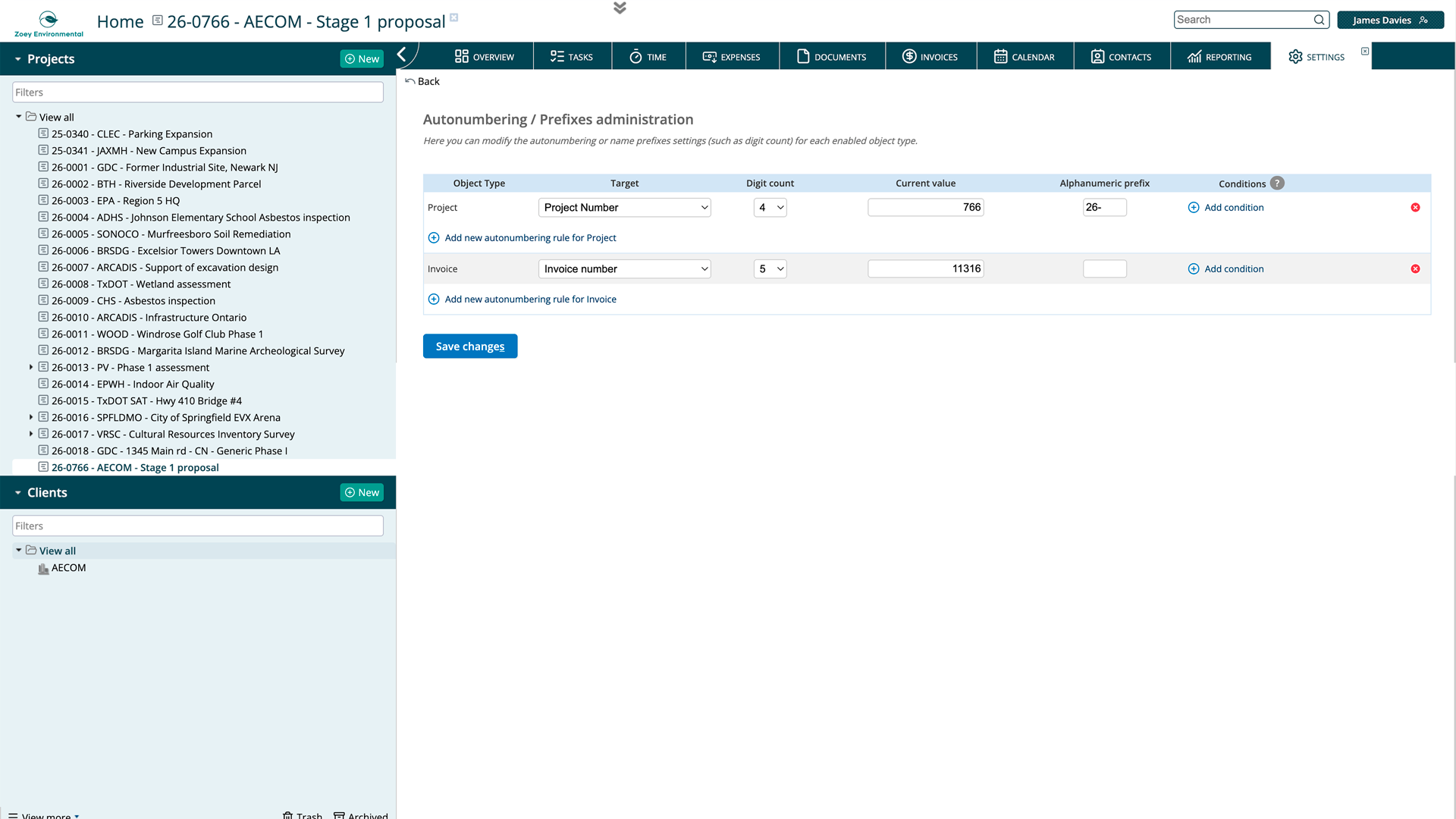
The starting point is Settings, then General Configuration, then Autonumbering Prefixes Administration. Here, you define the structure of your project names: which data points to include, in what order, and how they connect. You might configure a format that pulls the client name, the project location, and the service type, separated by a dash, followed by an incremental number. Whatever naming convention your firm uses, you build it here once, and it applies to every project going forward.
The name builds in real time as you fill the form
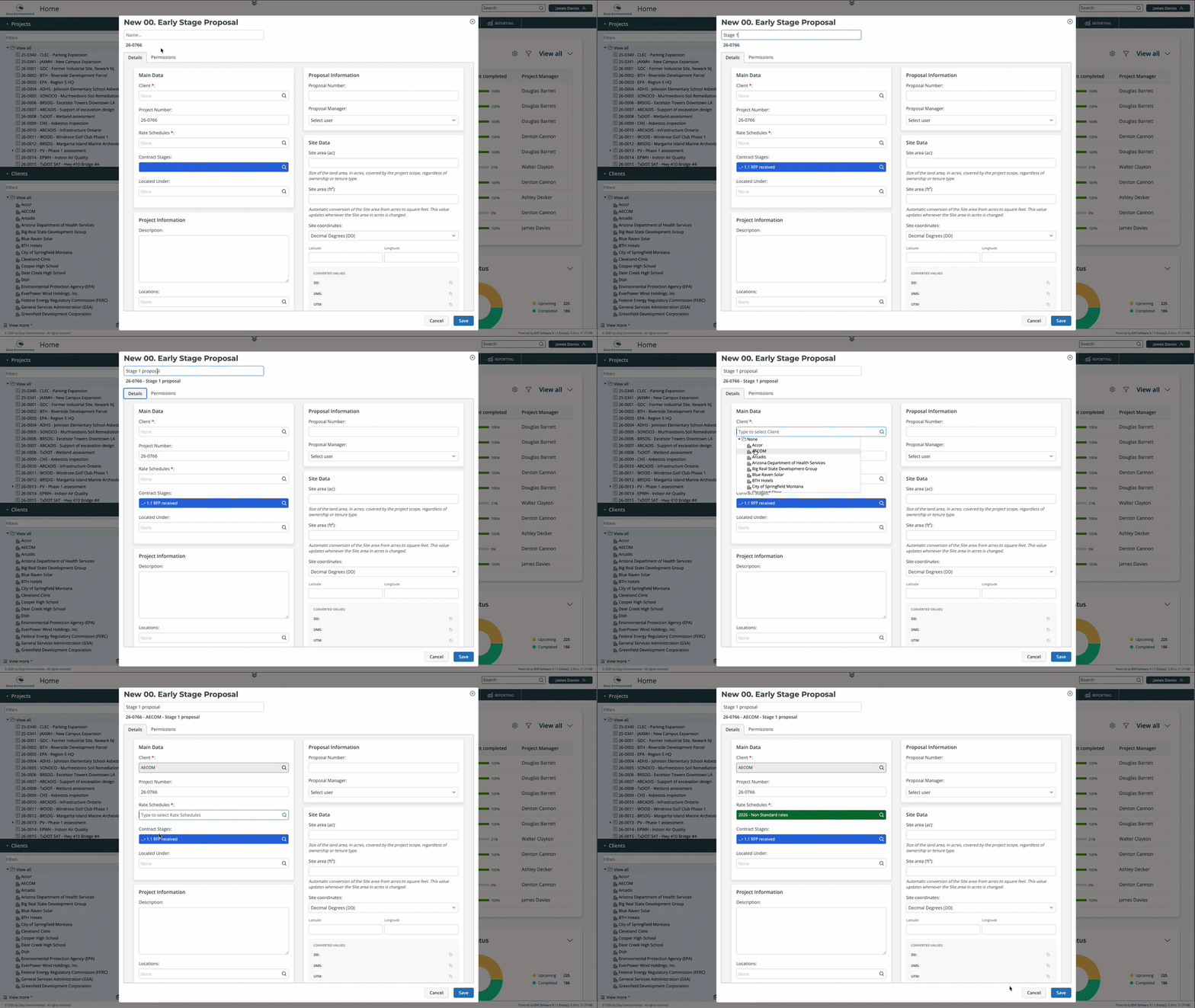
Once your format is configured, the project name assembles itself as you work. When you open a new project form and start filling in the fields, the name appears at the top of the form and updates in real time as you add each piece of information. Select the client, and the client’s name appears in the name. Add the location, and it joins the structure. By the time the form is complete, the project name is already there, built correctly, with an incremental number assigned automatically to distinguish it from other projects with similar properties.
What you can and can't edit
The variables in the name, the parts pulled from your configured format, are locked because changing them manually would defeat the purpose of having a consistent system. But if your naming format includes a free-text element, like a short project description or a custom label, that part remains editable. You get consistency where it matters and flexibility where it’s needed.
What does this change day to day
No more naming inconsistencies
Every project created in Feng Office follows the same format, regardless of who creates it or when. That consistency makes the project list easier to navigate, search results more reliable, and reports cleaner, because the data is structured the same way across every record.
No more double entry
The project name is built from data already being entered in the form. Client, location, service type: these fields exist in the project record for a reason, and now the naming system uses them directly. You’re not entering the same information twice.
Incremental numbering without manual tracking
The numbering is automatic and incremental, so you never have to check what the last project number was or worry about assigning a duplicate. Feng Office handles it, and the number is part of the name from the moment the project is created.
Why this matters for project-based firms
Professional service firms often run concurrent projects across multiple clients, locations, and service types. Each one needs to be clearly identifiable without ambiguity. A consistent, automatically generated project name means anyone on the team can find the right project quickly, and the records behind it are structured well enough to support accurate reporting and billing from the start.
In short
Automatic project naming in Version 4 means your firm’s naming convention is defined once and applied consistently to every project, built in real time from the data you’re already entering. No manual typing, no inconsistencies, no double entry, and no gaps in your numbering sequence. The project name is ready before you finish the form.
Book a private tour
See automatic naming working on a real project form
Seeing the project name build itself in real time as you fill in the fields is a different experience from reading about it. You tell us how your firm currently handles project naming, and we’ll show you exactly how Version 4 replaces that process.
- Watch a project name assemble in real time from a live form, with your naming logic applied
- See how incremental numbering works and how the format is configured in settings
- Ask anything about free-text fields, format flexibility, and how existing projects are handled
- Get a clear picture of what the transition looks like for your firm before you commit to anything
About Feng Office
Built for the way project-based firms actually operate
Feng Office is not a generic project management tool with a few extra fields. It is a business management platform built specifically for project-based firms, where projects are complex, billing structures vary, and the people doing the work are often the same people managing it.
We are software experts, not project delivery professionals. Our job is to understand the operational reality of running a project-based firm and build tools that clear the administrative path, so your team can stay focused on the work that actually matters.
100%
Human support during implementation and beyond
1
Platform for projects, billing, invoicing, and reporting
PBF
Built exclusively for project-based firms
4.0
The most complete version we have ever shipped
⚙
Everything connected
Tasks, time entries, expenses, billing, and financial reporting live in one place. Nothing gets lost between the project and the invoice.
◎
Built for complexity
Multiple service lines, variable billing structures, work that doesn't fit a generic template. Feng Office was designed around that reality, not adapted to it.
↗
Visibility at every stage
You stop finding out a project is over budget after the invoice goes out. The reporting module shows where each project stands on budget, schedule, and billing at any point.
◈
Support that walks with you
Implementation is not a handoff. Our support is 100% human, and we are present during setup, onboarding, and every step after that.
⊞
One platform, not three systems
Data in one place, invoices in another, reports in a third. Feng Office replaces that with a single working environment where everything connects.